
Managing the Team Using a Simple Visual Board

The recent developments and increased affordability of technology in sports created a certain belief that teams need to collect and analyze a tremendous amount of data to monitor and manage their athletes. This involves, but is not limited to, GPS and positional data, morning wellness and heart-rate variability (HRV), blood analysis, jump analysis, movement screens, sleep patterns, and game analyses. Although these monitoring practices can certainly be beneficial, following the keep-it-simple-stupid (KISS) is always a better starting approach. In this short article, I will demonstrate one simple visual management system, using the Visual Kanban Board, that can be implemented without too much cost but that can be very effective in managing the team and aligning different team departments (e.g., head coaches, physiotherapists, and physical preparation coaches). Once these are visualized, it is much easier to create ceremonies around this board, which is the term from the Agile and Lean cultures, to spot potential issues as well as to align the team with the needed interventions. One example might be when to play the athlete that was recently injured – if his or her status has been continuously updated and discussed, then it would be much easier to reach an agreement on that very important question.
The purpose of visual management is to simply, transparently, and clearly depict the current state of affairs and processes in the team. This current state can be easily captured with the elements depicted in Figure 1.
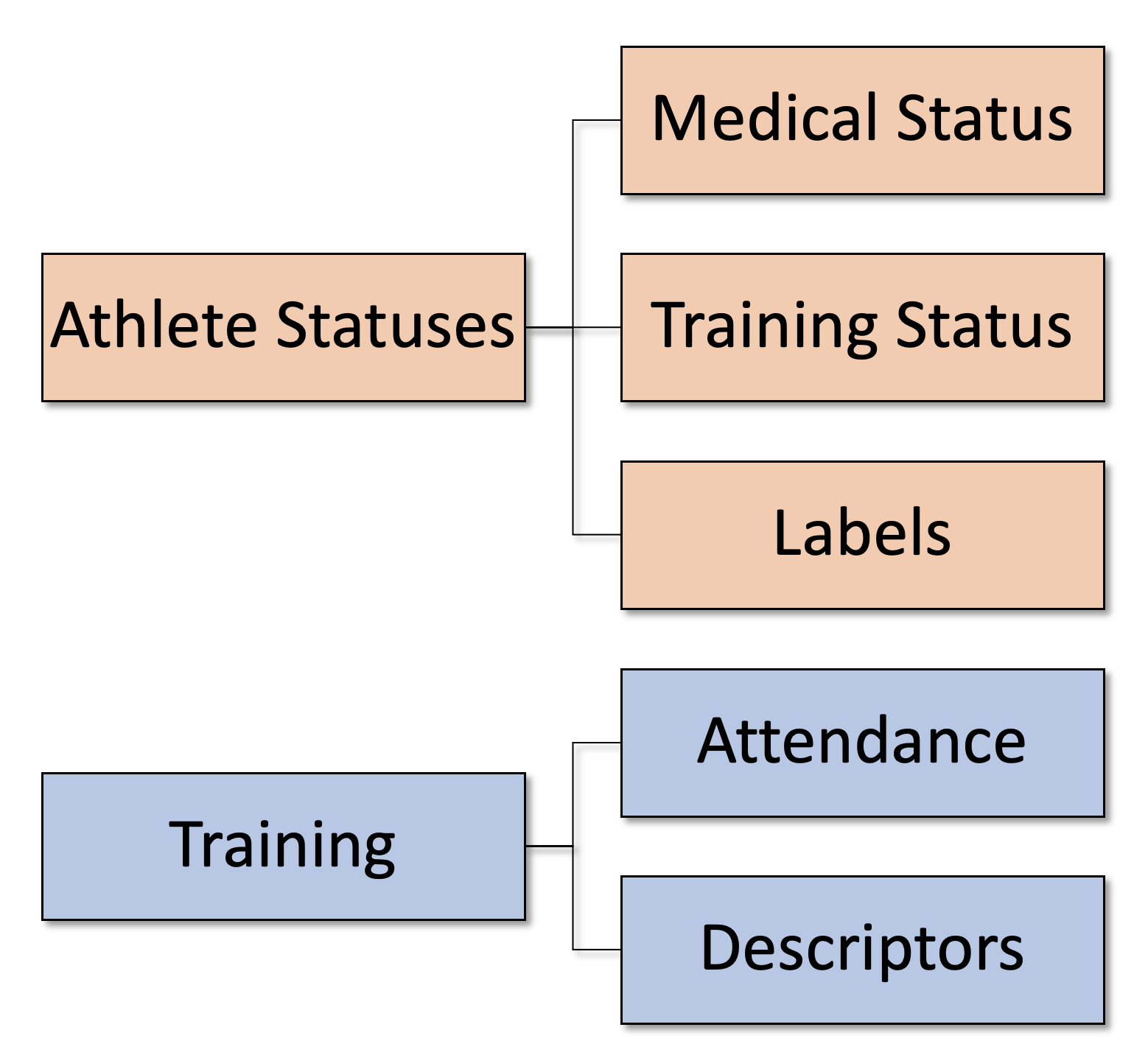
Figure 1: Elements of the Visual Board
The major element I will cover in this article is the Athlete Status. As can be seen in Figure 1, Athlete Status consists of two elements: (1) Medical Status and (2) Training Status, while (3) Labels provide additional information needed to inform the coach and the team.
Table 1 enlist potential Medical Statuses that an athlete can have in one instant in time. This list is modified based on the list provided by Dijkstra et al. (2014). For example, if the athlete is without any issues, then his or her current Medical Status can be set to “Available – no issues”. If you know that athlete had certain issues in the past (for example, a tendency to pull hamstrings or groin, or has recovered from the ACL reconstruction surgery) but doesn’t have any issues now, you still need to take that into consideration when planning the training; then the status can be set to “Available – asymptomatic issues”. The athlete that recently had the ACL reconstructed but still has knee swelling after heavy training load can have the “Available – symptomatic issues”. If the athlete needs modified training and is still unable to sustain normal training, then the status can be set to “Modified – symptomatic issues”. If the athlete is completely unavailable for training, for example, outgoing surgery, or needs to rest due to illness, the status can be set to “Unavailable”. The “Other” status can be related to something that we cannot classify with the previous five categories.
If you are training female athletes, you can potentially use “Available – asymptomatic issues” or “Available – symptomatic issues” Medical Status when the athletes are in their menstrual cycle since it has been shown to negatively affect the training.
| Medical Status | Description |
|---|---|
| Available – no issues | Healthy – no illness/injury |
| Available – asymptomatic issues | Asymptomatic chronic illness/injury (well controlled)—for example: Asthma—well controlled; Insufficient Vitamin D; Previous ACL injury |
| Available – symptomatic issues | Symptomatic illness/injury in full training/competition—for example: Previous ACL/partial meniscectomy with mild effusion/pain associated with loading/training |
| Modified – symptomatic issues | Symptomatic illness/injury with modified training—for example: Recent stress fracture, asymptomatic and doing modified training but still unable to sustain normal training load |
| Unavailable | Symptomatic illness/injury—no training—for example: Pneumoni with high fever |
| Other | Unknown |
Table 1: Medical status. This list is modified based on the list provided by Dijkstra et al. (2014)
Medical Status can take only one value (e.g., either athlete is “Available – no issues” or not). We still might want to know extra information that can help us in planning the training or something that we need to be extra careful about. Table 2 contains hypothetical classes of labels that can be used as a piece of extra information together with Medical and Training statuses. These can also take the form of a standardized classification system, particularly injuries and illnesses (Orchard et al. 2020).
| Label Type | Example |
|---|---|
| Current Injury | ACL reconstruction; hamstring strain grade 2 |
| Current Illness | Flu; COVID |
| Previous Injury – symptomatic | menisectomy; quad strain grade 3 |
| Previous Illness – symptomatic | COVID infection |
| Previous Injury – asymptomatic | Ankle torsion |
| Previous Illness – asymptomatic | Pneumonia |
| Food Alergies | Peanuts |
| Drug Alergies | Alergy on certain antibiotics |
| Identified Issues | Basketball specific that demand extra individual work; Ankle stiffness; Smoker |
| Match minutes | Rolling sum of the minutes playes in the last N-weeks or last N-matches |
| Attendance | Percentage brackets of rolling atttendance in the last N-weeks; please refer to the text for explanation |
Table 2: Extra labels
While the Medical Status is related to the current health or medical state of the athlete, Training status (Table 3) is related to the training and game availability. They are certainly related, but not necessarily so. For example, the athlete can be “Available – no issues” but might be out of the next game. Thus, the Training Status allows the coach to segregate the team more easily and hence provide a step towards training individualization.
| Training Status | Description |
|---|---|
| Full Training/Competition | Participates in all team sessions; planned to compete (i.e., travel with team) |
| Full Training/Reserve | Participates in all team session; planned to compete, but did not accumulate enough minutes in the match |
| Full Training/No Competition | Participates in all team session; not planned to play (i.e., cards, not traveling, outside of protocol) |
| Modified Full Training | Participates in all team session but needs some drills modified or skipped |
| Special Program | Doesn’t participate in normal team sessions; demands special program |
| Unavailable | Unavailable to train due to injury or illness |
| Away – Holiday | Unavailable to train due to non-training related issues (i.e. holidays, family) |
| Away – National Team | Unavailable to train due to National Team obligations; could also be borrowed) |
| Other | Unknown |
Table 3: Medical status
In my opinion, it is best to visualize the Training Status as separate sections of the Visual Board. Figure 2 depicts one such approach. Athletes that are away (i.e., “Away – Holiday” or “Away – National Team”) can be positioned in two columns. Athletes that are medically “Unavailable” or have “Modified – symptomatic issues” can be positioned in the 3 or more columns “Return to Play” group on the board. This way, the whole performance team can track and define certain criteria in Return To Play (RTP) protocol. The rest of the athletes that are medically available can be segregated into the “No-Competition”, “Reserves” (i.e., travel with the team but did not acquire the needed minutes in the game), and “Competition” columns.
This board allows for a very transparent current state of the team, that the performance team can gather around (i.e., ceremonies) daily and quickly update the statuses as well as use it to prescribe training. For example, “Reserves” are the athletes that did not acquire needed minutes in the previous game and can thus be part of the normal training with potential extra conditioning at the end. Athletes from the “Competition” column might need extra rest or recovery strategies.
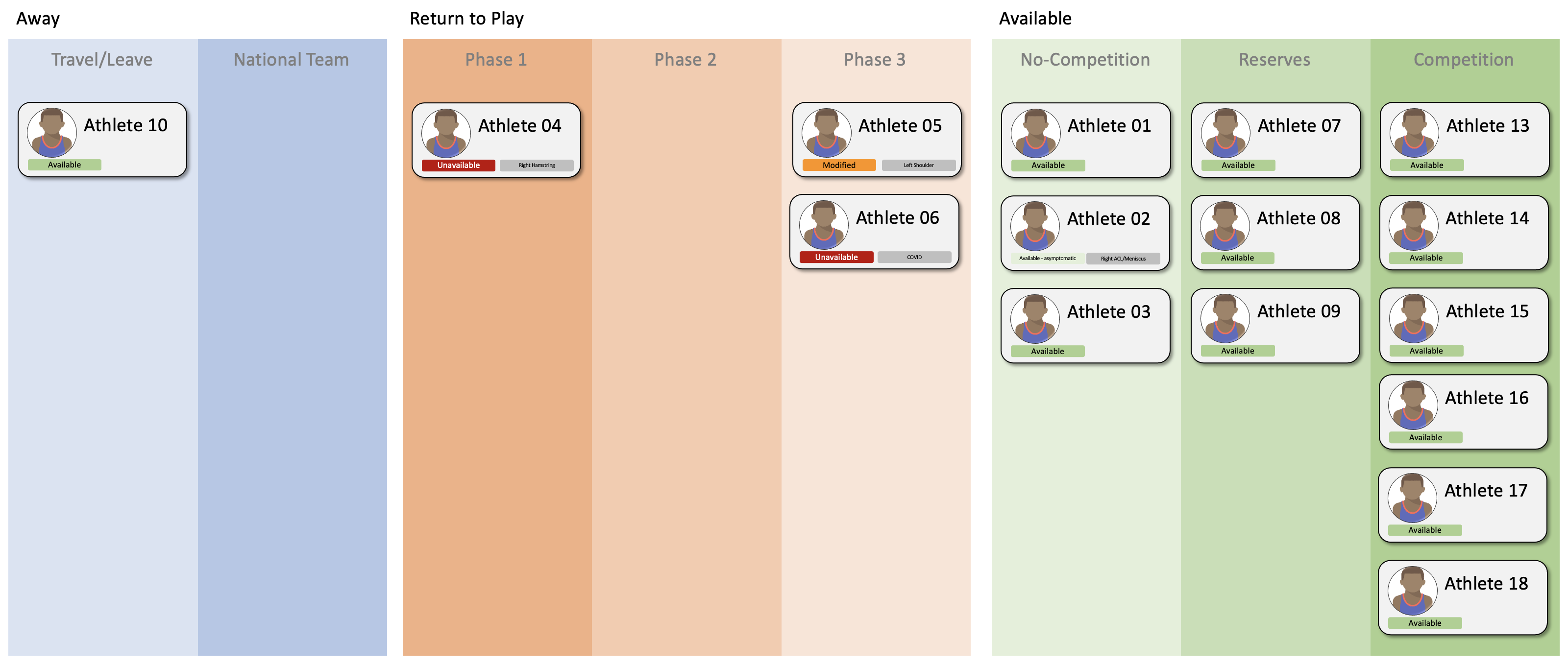
Figure 2: Visual Board or the Kanban Board
How can the board from Figure 2 be implemented? The simplest solution would be to use a large whiteboard with designated columns, and each athlete can be a magnet that can move across the board. Medical Status and Labels can be small stick notes that can be attached to those sliding magnets.
Another solution would be to use software such as Trello[1], Asana[2], my own AthleteSR[3], or any other Kanban board software that is often available for free for small teams.
Another common question regarding the Visual Boards is whether the athletes should be aware of the same? That is an important question to be asked, but the answer depends on your team culture – some coaches and teams prefer athletes not to be aware of such a board, while others prefer them to be. The answer depends on your specific situation.
In addition to setting and tracking Athlete Statuses, one very simple monitoring strategy that can be implemented without too much cost is Attendance Monitoring (Table 4). This attendance can be simply tracked in Microsoft Excel or Google Sheets for every session. By simply tracking rolling attendance (i.e., how many sessions were planned for a given athlete in the last N weeks and how many were fully attended), one can have a very simple and pretty much cost-free monitoring system. These metrics can be calculated every few days and can also be depicted on the Visual Board. This, of course, demands more specialized software, or it can also be a simple Label that can be more than enough in most circumstances (i.e., “100% attendance”, “>95% attendance”, “>90% attendance”, and so forth)
For example, if the athlete did not have 100% of full participation in the last 7 days after completing Phase 3 of the Return To Play program, then the athlete is not allowed to play the game. Again, these criteria can be decided by the performance team – the Visual Board is just there to transparently depict such ideas so that everyone in the performance team is aligned with the current situation.
| Attendance | Description |
|---|---|
| Full | Fully participate in all session |
| Partial | Fully participate in most of the session |
| Modified | Participates in the session with modifications |
| Missed | Missed |
| Other | Other |
Table 4: Attendance
Simple attendance tracking can be the initial step in training monitoring, but we might also be interested in what type of training sessions were done, which of them did the athlete miss, or which type of sessions did the athlete accumulate the most. For example, did the athlete miss basketball sessions more or gym sessions? If the athletes performed different types of sessions, we might also want to track certain indicators of training load (TL), which can simply be minutes (particularly if our team doesn’t have access to GPS or position-tracking technology). For example, we can track how many minutes in the last N-weeks did the athlete spend on defense training. To achieve this goal, we might want to add an extra session’s “Descriptors” (or tags) in our simple monitoring system. The full description of this system is beyond the scope of this article, but it can certainly be done without expensive technology and can be more than enough to help implement an effective monitoring system. In addition to these, we might also be interested in tracking the distribution of the Athlete Statuses in the last N-months (e.g., 90% of the training days, the athlete was “Available – no issues”).
Most teams do not need expensive technology with numerous load metrics but a simple, transparent, and visual system that can align the team in decision-making. Yes, technology can add extra information, but until one has transparent practices in place, such as this one explained in this article, extra technology will not solve anything but add extra noise rather than extra actionable information. Keep it Simple Stupid.
References
- Dijkstra, H Paul, N Pollock, R Chakraverty, and J M Alonso. 2014. “Managing the Health of the Elite Athlete: A New Integrated Performance Health Management and Coaching Model.” British Journal of Sports Medicine 48 (7): 523–31. https://doi.org/10.1136/bjsports-2013-093222.
- Orchard, John W, Willem Meeuwisse, Wayne Derman, Martin Hägglund, Torbjørn Soligard, Martin Schwellnus, and Roald Bahr. 2020. “Sport Medicine Diagnostic Coding System (SMDCS) and the Orchard Sports Injury and Illness Classification System (OSIICS): Revised 2020 Consensus Versions.” British Journal of Sports Medicine 54 (7): 397–401. https://doi.org/10.1136/bjsports-2019-101921.
- Trello https://trello.com/ [1]
- Asana https://asana.com/ [2]
- AthleteSR https://athletesr.com/ [3]






Responses