
Managing Athletes Using Trello – Part 2

In case you missed the previous part, you can find it here.
An athlete is on modified training, but that never reaches the head coach. A rehab task is “someone’s responsibility,” yet nobody checks whether it was done. A return-to-play timeline exists verbally and quietly drifts week by week.
The problem isn’t motivation or intent. It’s visibility.
In Part 1, the focus was on why teams need a shared, visual way of tracking athlete status. Here, the focus shifts to implementation. Not theory, but how to actually build a simple structure that makes status, progress, and ownership clear to everyone involved.
The Basic Structure
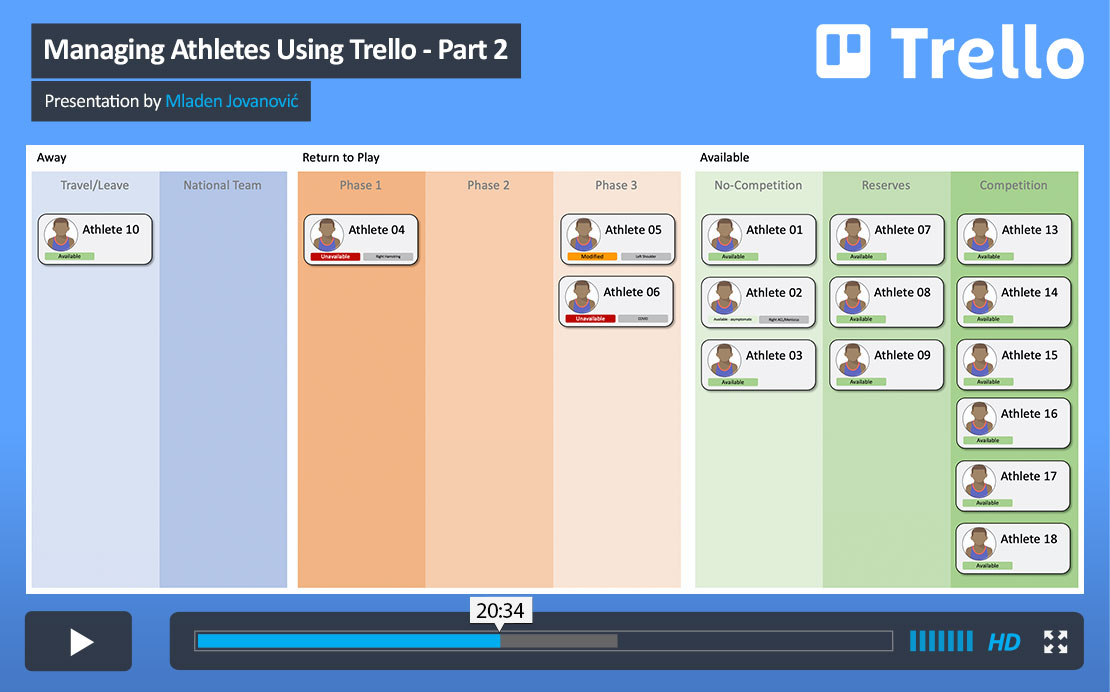
Create a Trello account, set up a workspace, and build a board for your team. Archive the default columns and replace them with status lists that reflect how your athletes actually move through the week and through injury:
- Available
- Return to Play 1, 2, 3
- Away
Each athlete becomes a card, and their current status is defined by where that card sits. When their situation changes, the card moves with it. You don’t need to interpret reports or recall conversations. The board shows you the current reality.
Athlete Cards and Templates
Each card holds the operational details: descriptions, attachments, assigned staff members, and dates. Adding a cover photo of the athlete makes the board easier to scan during short morning check-ins, especially when you’re managing a full squad.
Once you set up one card properly, turn it into a template. Every new athlete then starts from the same structure. That consistency prevents small differences from creeping in mid-season and keeps your process stable even as workload increases.
Tracking Status
There are two free options for tracking health status in Trello: Labels and the Amazing Fields Power-Up.
Labels are built in and simple. You can create color-coded tags such as “Available,” “Symptomatic,” or “Unavailable.” They work well for quick categorization, but they do not record who changed a label or when it was changed.
Amazing Fields addresses that limitation while remaining free. By creating a dropdown field for athlete status, every update is logged, including who made the change. That may seem like a small detail, but in practice it improves communication and reduces ambiguity. When needed, you can trace decisions back to a specific moment.
Within the same Power-Up, you can add a return-to-play progress bar and a target return date that shifts color as the deadline approaches. This keeps progression visible without relying on separate spreadsheets or side conversations. The relevant information lives inside the athlete’s card, where it belongs.
Standardized Operating Procedures
This is where the system becomes more than just a board with names on it.
Create a separate board for standardized operating procedures. This board does not track athletes. It stores templates for recurring situations. For example, a card titled “ACL Reconstruction – Phase 1” might include a checklist covering swelling control, restoring full extension, quadriceps activation, balance and weight-bearing drills, and normalization of gait mechanics.
When an athlete enters that phase, you copy the card into the team board rather than recreating the process from memory. Each checklist item can be assigned to a specific staff member with a due date attached. Ownership becomes explicit, and progress can be reviewed without relying on informal updates.
Over time, this reduces variability in how similar cases are handled and strengthens the reliability of your processes.
The Daily Stand-Up
The real value of the system shows up in daily use.
You open the board, scan the columns, and immediately see who is available, who is progressing through return to play, and what tasks remain outstanding. Cards move as status changes, progress indicators update, and responsibilities are reviewed in a matter of minutes.
Instead of reconstructing last week’s discussions or searching through messages, the board gives everyone on staff the same starting point every morning.
Why This Works
Trello was not designed as athlete management software, and it doesn’t need to be. What it provides is a stable, visible structure that supports consistent decision-making. It documents changes, clarifies ownership, and reduces the likelihood that important details disappear between sessions.
The goal is not to build an elegant or perfectly optimized system. The goal is to create a reliable one that the staff actually uses. Over the course of a long season, robustness matters more than sophistication. A simple structure that stays in place and evolves gradually will serve a team better than a complex system that collapses under its own weight.
Start with something clear and usable. Let it earn trust through daily repetition. From there, refinement becomes possible without sacrificing stability.
If you are interested in a more elaborate athlete monitoring system, please check our AthleteSR.






Responses